

Products from this category


Brand: UGREEN
Vendor code: 886352692
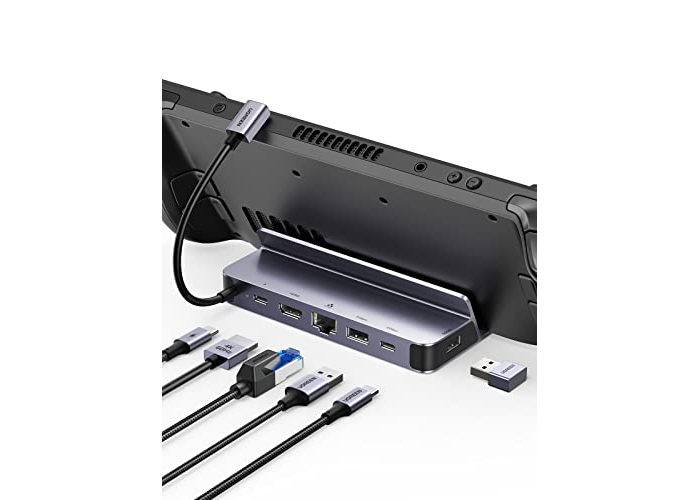
UGREEN Steam Deck Dock compatible with Steam Deck OLED
Out of stock
Product description:
more details
About this article
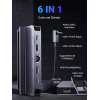
- 6-in-1 USB-C Dock: The dock expands multiple ports for Steam Deck: 1 x HDMI 4K@60Hz, 1 x Gigabit Ethernet, 1 x USB-C port, 2 x USB 3.0 ports, and 1 x PD 100W USB-C charging port. This transforms Steam Deck into a multimedia station, allowing you to enjoy your device in a whole new way.
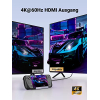
- 4K@60Hz HDMI: The USB-C docking station supports resolutions up to 4K@60Hz. Mirror your screen and stream 4K videos to a monitor. Ideal for enjoying games on a larger screen.
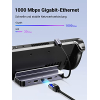
- Gigabit Ethernet and USB-C/A ports for fast data transfer: 1000 Mbps internet speeds allow you to play games without stuttering or lag. The dock's USB-C and two USB 3.0 ports support data transfer rates of up to 5 Gbps, allowing you to transfer 1 GB of files in 4 seconds.
- PD 100W Fast Charging: The docking station's USB-C charging port powers your device, providing enough power for extended use. Your fun won't be interrupted.
- Convenient design. Enjoy a smooth gaming experience at all times. The docking station with stand fits perfectly on the Steam Deck case, allowing you to enjoy the game while keeping your desk tidy.
- Wide Compatibility: The USB-C hub is compatible with devices such as laptops, tablets, and mobile phones with USB-C ports, such as MacBook Pro/Air, iPad Pro/Air, Galaxy S24/S23, Galaxy Tabs, Surface Go 3/2, Surface Pro 9/8/7, etc.


Specification:
all specifications
Product Model:
15388
Colour:
Space Gray
Compatible devices:
Steam Deck, Steam Deck OLED, ASUS ROG Ally
Hardware interface:
USB Type C, USB, Ethernet, HDMI
Input voltage:
2E+1 Volts
Item weight:
220 Grams
Vendor code: 886352692
UGREEN Steam Deck Dock compatible with Steam Deck OLED
20€
-20%
was: 25€
tax included in price
Here is your secret promo code
Copy the promo code and paste it at checkout to find out your discount amount
Show code
0722209268
Pay with Visa/MasterCard (LiqPay), Apple Pay, PrivatPay Google Pay, PayPal, payment via IBAN. Request an invoice
Return the product within 14 days. more details about the return conditions
We do everything we can to protect your security and privacy. Our payment security system encrypts your data during transmission. We do not provide your credit card details to third parties and do not sell your information to third parties. Free shipping applies only to small-format goods, more about shipping and rates.

Product overview
About this article
- 6-in-1 USB-C Dock: The dock expands multiple ports for Steam Deck: 1 x HDMI 4K@60Hz, 1 x Gigabit Ethernet, 1 x USB-C port, 2 x USB 3.0 ports, and 1 x PD 100W USB-C charging port. This transforms Steam Deck into a multimedia station, allowing you to enjoy your device in a whole new way.
- 4K@60Hz HDMI: The USB-C docking station supports resolutions up to 4K@60Hz. Mirror your screen and stream 4K videos to a monitor. Ideal for enjoying games on a larger screen.
- Gigabit Ethernet and USB-C/A ports for fast data transfer: 1000 Mbps internet speeds allow you to play games without stuttering or lag. The dock's USB-C and two USB 3.0 ports support data transfer rates of up to 5 Gbps, allowing you to transfer 1 GB of files in 4 seconds.
- PD 100W Fast Charging: The docking station's USB-C charging port powers your device, providing enough power for extended use. Your fun won't be interrupted.
- Convenient design. Enjoy a smooth gaming experience at all times. The docking station with stand fits perfectly on the Steam Deck case, allowing you to enjoy the game while keeping your desk tidy.
- Wide Compatibility: The USB-C hub is compatible with devices such as laptops, tablets, and mobile phones with USB-C ports, such as MacBook Pro/Air, iPad Pro/Air, Galaxy S24/S23, Galaxy Tabs, Surface Go 3/2, Surface Pro 9/8/7, etc.
Specifications
Colour
Space Gray
Compatible devices
Steam Deck, Steam Deck OLED, ASUS ROG Ally
Hardware interface
USB Type C, USB, Ethernet, HDMI
Input voltage
2E+1 Volts
Item weight
220 Grams
Total HDMI ports
1
Wattage
100 watts
Weight (g)
220.0
Questions
0 questions
No questions about this product, be the first and ask your question.
Related Products
-20%


-36%

Related Products
-20%
-36%